An online Arduino simulator with a real circuit around it
Test Arduino code without a board. Write a sketch in the code editor, wire the board to LEDs, buttons, sensors, displays and motors on a breadboard, and run it: the sketch drives the circuit, the circuit feeds the sketch, and the Serial Monitor shows what it prints.
Code and circuit together
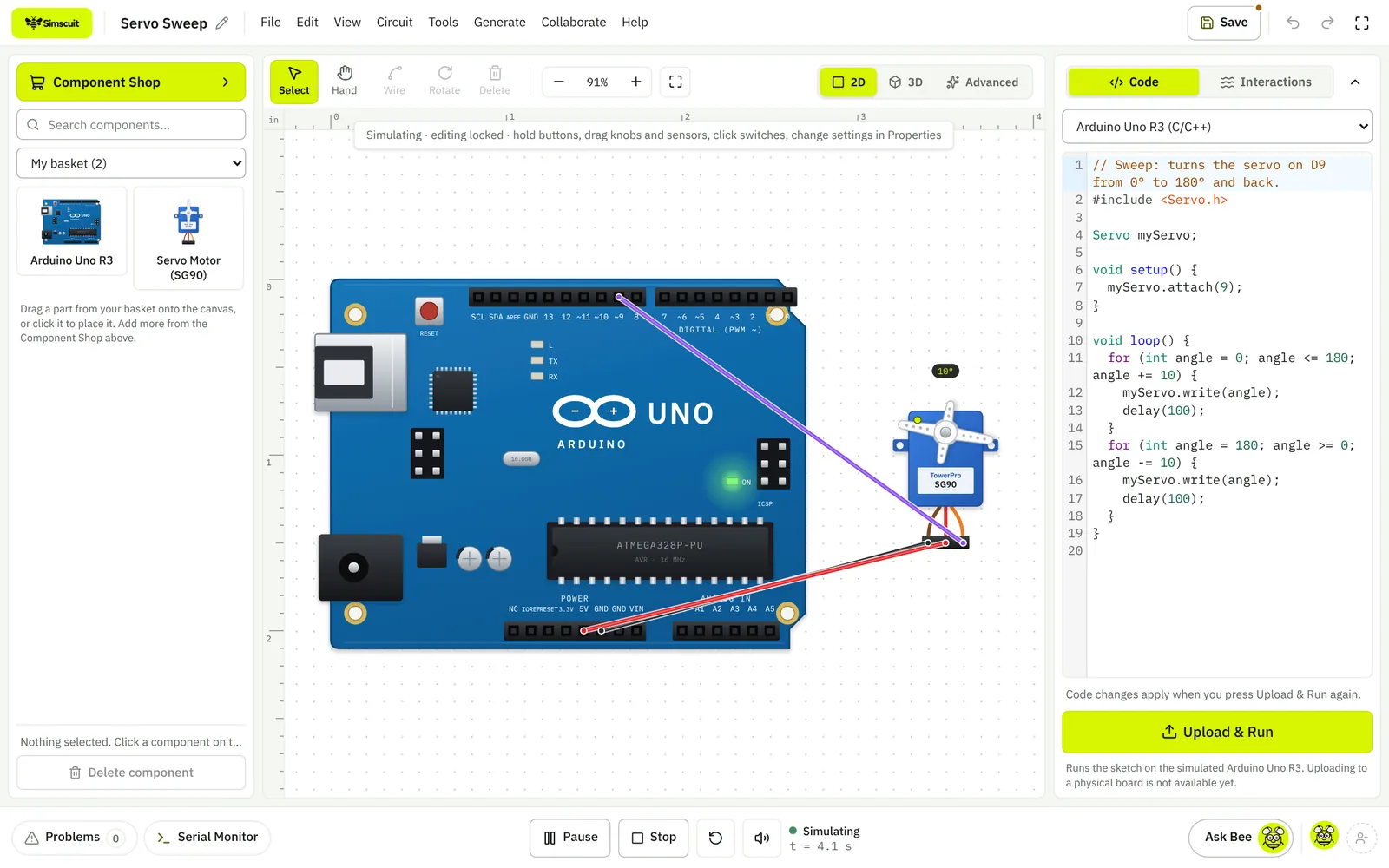
The sketch editor sits beside the breadboard. Upload & Run starts the simulation; the running line is highlighted, Serial.print output appears in the Serial Monitor, and you can type into the monitor to send the sketch text. Change a potentiometer or press a button while it runs and the sketch sees it on its input pins.
Why test Arduino code in Simscuit
- Your sketch drives a real-looking circuit: LEDs light, servos sweep, displays draw and motors spin as the code runs
- More boards than just the Uno: Nano, Mega, Leonardo, Due, R4 WiFi, ESP32, ESP8266, Pico W, STM32, Teensy 4.1 and micro:bit
- Displays and sensors that answer like the real modules: LCD, OLED, TFT, NeoPixel, DHT, DS18B20, BME280, MPU6050, HC-SR04 and more
- Safe mistakes: a missing resistor burns out a virtual LED and the Problems panel explains why, instead of costing you a real part
- Free, in the browser, with your projects saved to your account
Boards you can simulate
Arduino Uno R3, Uno R4 WiFi, Nano, Mega 2560, Leonardo, Due, Nano 33 BLE Sense, Nano ESP32 and MKR WiFi 1010; ESP32 DevKit V1, ESP32-S3-DevKitC-1, Seeed XIAO ESP32C3 and NodeMCU ESP8266; Raspberry Pi Pico W and XIAO RP2040; STM32 Nucleo-F401RE and Blue Pill; Teensy 4.1; BBC micro:bit V2 and Circuit Playground Express. Each board uses its own pin numbering, logic voltage and analogue resolution.
Arduino functions and libraries
setup() and loop(), variables, arrays, functions and the usual control flow; pinMode, digitalWrite, digitalRead, analogRead, analogWrite, tone, pulseIn, shiftOut, millis, delay, map, constrain and the maths functions; and Serial in both directions. These libraries work in the simulator:
- Servo, LiquidCrystal and LiquidCrystal_I2C for character LCDs
- Adafruit SSD1306 and SH1106 OLEDs, ST7735, ST7789 and ILI9341 TFTs through the Adafruit GFX calls
- Adafruit NeoPixel, LedControl (MAX7219) and TM1637 displays
- DHT, DallasTemperature (DS18B20), BME280, BMP280, SHT31, AHT20, MCP9808 and other environmental sensors
- MPU6050, ADXL345, VL53L0X and VL53L1X, HC-SR04 distance with pulseIn, HX711 load cells
- Wire (I2C), SoftwareSerial with HC-05 and HC-06 Bluetooth modules, RTClib, SD, MFRC522 RFID, TinyGPS++ and Keypad
Example: blink an LED
This is the LED Blink template. Paste it into a new project with an LED and a 220 Ω resistor on pin 13, press Upload & Run, and the LED flashes once a second.
void setup() {
  pinMode(13, OUTPUT);
}

void loop() {
  digitalWrite(13, HIGH);
  delay(1000);
  digitalWrite(13, LOW);
  delay(1000);
}
Limits to know
Sketches run in Simscuit’s own Arduino interpreter, which covers the common Arduino functions and the libraries listed above. It does not emulate the chip itself, so interrupts, classes, structs and pointers are not supported yet, and timing is close to a real board rather than cycle-exact. Parts outside the simulating set are placeable and wireable but marked Visual only.
When your sketch is ready, upload it to a real board with the Arduino IDE; uploading from Simscuit itself is not available yet.
Questions
Can I use any Arduino library?
Only the libraries listed on this page are simulated today. A sketch that includes another library is reported before it runs.
Is it free?
Yes. Circuit Studio with Arduino simulation is part of the free plan.
Can students use it on Chromebooks?
Yes. Simscuit runs in the browser, so it works on Chromebooks and school computers without installing software.